

OVERVIEW
The Reassign Actions Admin Console can only be accessed by Content Manager Administrators or Records Managers.
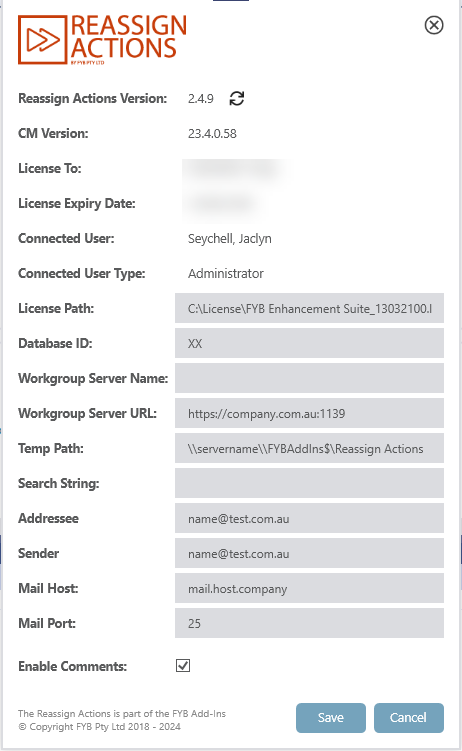
To update the application settings please follow these steps below:
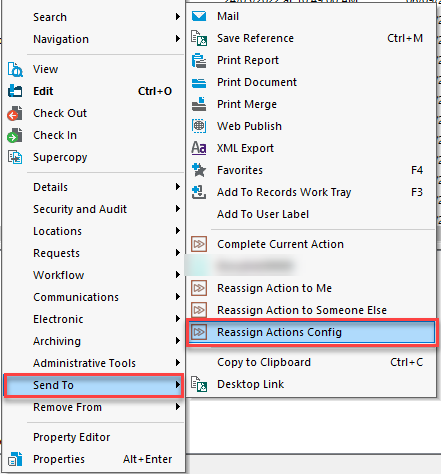
- Within Content Manager, right click on a record > Send to > Reassign Actions Config
- The setting window will display
The Reassign Action Admin Console contains the following updatable settings:
LICENSE PATH
The path to the license for Reassign Actions. Clicking on the path will allow for a new license to be selected. More information on updating the license can be found in the Reassign Actions License Update Guide.
DATABASE ID
The ID of the dataset Reassign Actions will be connected to.
WORKGROUP SERVER NAME
The workgroup server name the dataset will connect to. Dataset connection can be made using the workgroup server name or workgroup server URL.
WORKGROUP SERVER URL
The workgroup server URL the dataset will connect to. Dataset connection can be made using the workgroup server name or workgroup server URL.
TEMP PATH
The temp path utilized by Reassign Actions. This path must be a shared network path (Example: \\Server\fybaddins$\ReassignActions\ )
SEARCH STRING
A filter string that determines what will appear in the location search window. The search automatically filters to include only active and internal locations. Leave this string blank to include all location types.
For Example:
type: person // filter to only show locations of type person
type:person,group // filter to only show people and groups
ADDRESSEE
The email addresses (separated with ';') that will receive the license expiry email notifications from Reassign Actions.
SENDER
The email address uses to send email notifications from Reassign Actions
MAIL HOST
The mail host for sending email notifications from Reassign Actions
MAIL PORT
The mail port for sending email notifications from Reassign Actions
ENABLE / DISABLING COMMENTS
When completing an action, the ability to add comments can be enabled or disabled from use.